2026
Type by Voice: macOS dictation at the cursor
Nhat Nguyen (Nate)
Problem
Developers and knowledge workers need to turn speech into text instantly, to prompt an AI, draft messages, or write faster without typing every word by hand. Like talking to a Jarvis: press a hotkey, speak, and the transcript lands at the cursor. Shipping that on Mac without burning CPU on-device means a thin client and a serious backend.
What I owned
End-to-end product: Swift menu-bar client (global hotkey, Opus capture, floating pill, clipboard paste insertion) and the Nest.js gateway that streams audio and returns a final transcript. Shared HTTP + WebSocket contract so later Windows / mobile clients can reuse the same API.
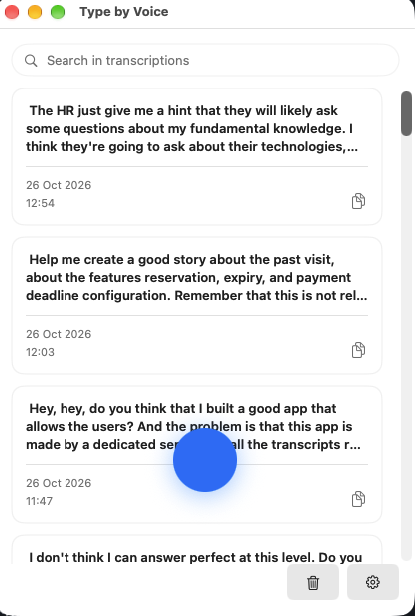
Architecture
The Mac app is LSUIElement only, with no Dock icon. Recording is a state machine (idle → connecting → recording → transcribing → inserting) with timeouts on every non-idle state. The pill stays on Connecting until mic frames and a server ready arrive, then Listening; pre-ready audio is buffered so leading words are not dropped.
Audio is Ogg Opus (~24 kbps) streamed over wss://…/v1/dictate after ready. The server assembles one payload per utterance and runs batch Whisper-class inference (Groq adapter). Text insertion prefers Accessibility paste (save clipboard → paste → restore); without Accessibility, the transcript stays on the clipboard with a notification.
Outcome
A downloadable unsigned macOS DMG on GitHub Releases, wired to a production API. English dictation with word-based weekly quota on the server. A real live app, not a mock.
Open on macOS
Right-click to Open does not work for this build yet. macOS Gatekeeper blocks unsigned apps, so you enable it once in System Settings.
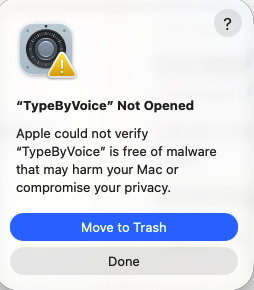
- After download, try to open TypeByVoice. You will see "TypeByVoice" Not Opened.
- Open System Settings → Privacy & Security, find "TypeByVoice" was blocked to protect your Mac, then click Open Anyway.
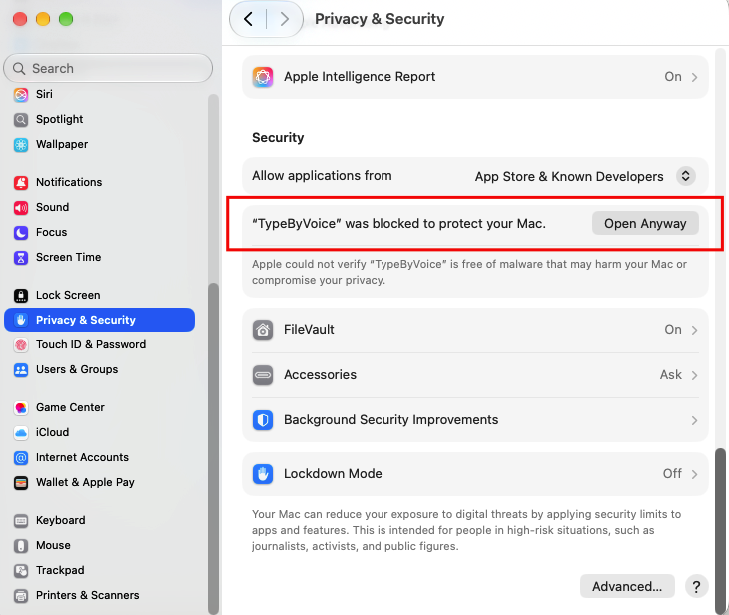
- Confirm when macOS asks again. After that, TypeByVoice launches normally.